If you’re searching for the best home design software for personal construction, remodeling, or professional planning, here’s the quick answer: Plan7Architect Pro offers the most complete solution for serious home design. It combines professional-grade tools with ease of use and supports both metric and imperial units, which makes it suitable for users worldwide.
Unlike many browser-based tools or software with a steep learning curve, Plan7Architect Pro allows you to design realistic floor plans and 3D models, generate builder-ready exports, and switch between European and American measurements with one click. You don’t need to rely on internet access or pay monthly fees.
Based on personal experience, after testing various platforms like AutoCAD, SketchUp, RoomSketcher, Planner 5D, and Sweet Home 3D, I found Plan7Architect Pro to be the most balanced tool—especially for private builders or homeowners who want to take control of their project without outsourcing everything to an architect.
What Makes a Good Home Design Software?
When evaluating home design software, there are a few crucial factors that make a real difference in practice:
- Intuitive 2D and 3D planning tools that work for both beginners and experienced users
- Support for multiple unit systems, including meters and feet, square meters and square feet
- Export functions for real architectural planning, like printable PDFs, DXF exports, and editable formats for engineers or contractors
- One-time purchase without forced subscription models
- High-quality visualizations to better present or understand spatial dimensions
- Offline capability, in case you want full performance on your own device without relying on a browser or internet connection
I’ve used tools that looked great in demos but failed when I needed to export clean blueprints for my builder. That’s when I learned that looking at the feature list isn’t enough—you need to test whether the software actually supports real planning work.
Direct Feature Comparison: Plan7Architect Pro vs Alternatives
Here is a direct comparison of the most relevant features that matter in real-world use.
2D/3D Floor Planning
- Plan7Architect Pro: Yes
- AutoCAD: Yes
- SketchUp: Limited (needs plugin)
- RoomSketcher: Yes
- Planner 5D: Yes
- Sweet Home 3D: Yes
Metric and Imperial Units Available
- Plan7Architect Pro: Yes
- AutoCAD: Yes
- SketchUp: Yes
- RoomSketcher: Yes
- Planner 5D: Yes
- Sweet Home 3D: Yes
Beginner-Friendly Interface
- Plan7Architect Pro: Yes
- AutoCAD: No
- SketchUp: Limited
- RoomSketcher: Yes
- Planner 5D: Yes
- Sweet Home 3D: Yes
Builder-Ready Exports (PDF, DXF)
- Plan7Architect Pro: Yes
- AutoCAD: Yes
- SketchUp: Limited
- RoomSketcher: Limited
- Planner 5D: No
- Sweet Home 3D: No
One-Time Purchase Option
- Plan7Architect Pro: Yes
- AutoCAD: No (subscription only)
- SketchUp: Limited (restricted one-time license)
- RoomSketcher: No
- Planner 5D: Yes (limited features)
- Sweet Home 3D: Yes
Localized for European and American Building Standards
- Plan7Architect Pro: Yes
- AutoCAD: Yes
- SketchUp: Limited
- RoomSketcher: Limited
- Planner 5D: Limited
- Sweet Home 3D: No
Offline Use Possible
- Plan7Architect Pro: Yes
- AutoCAD: Yes
- SketchUp: Yes
- RoomSketcher: No
- Planner 5D: No
- Sweet Home 3D: Yes
Plan7Architect Pro
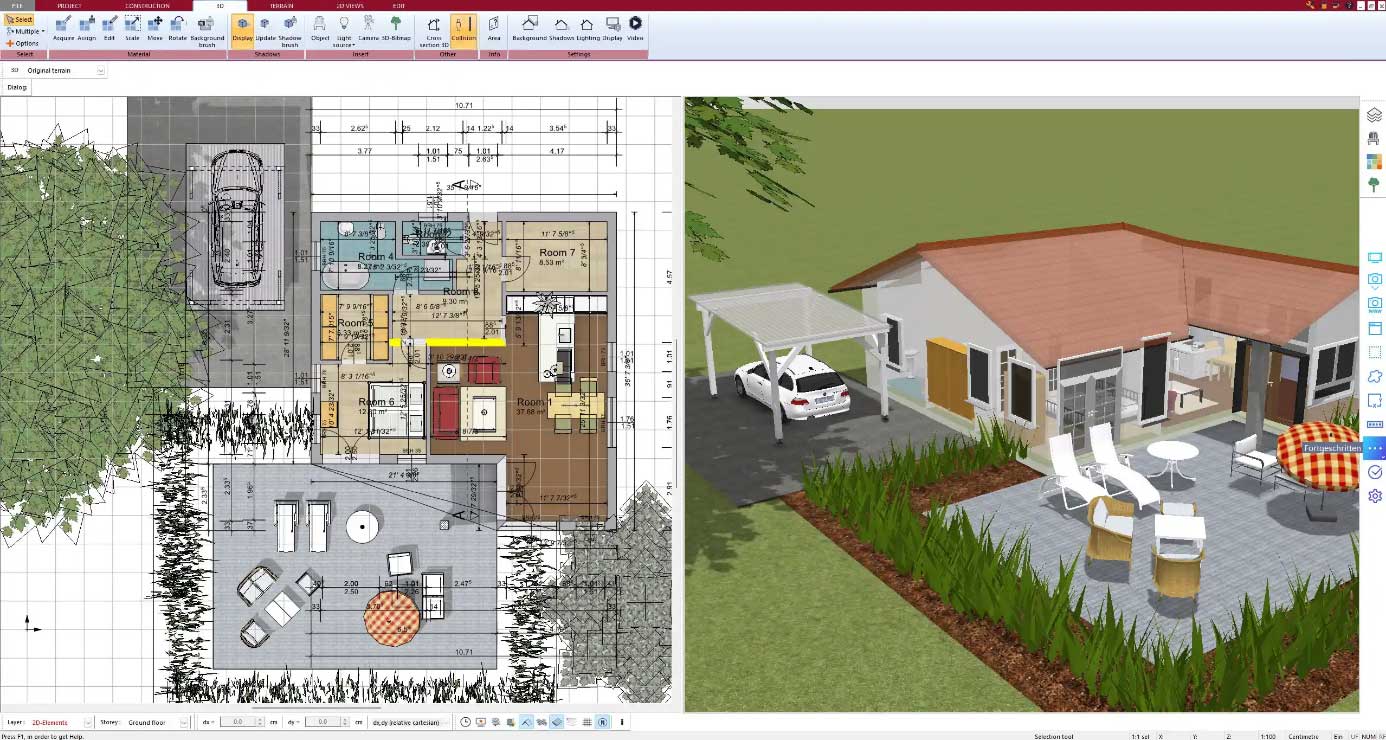
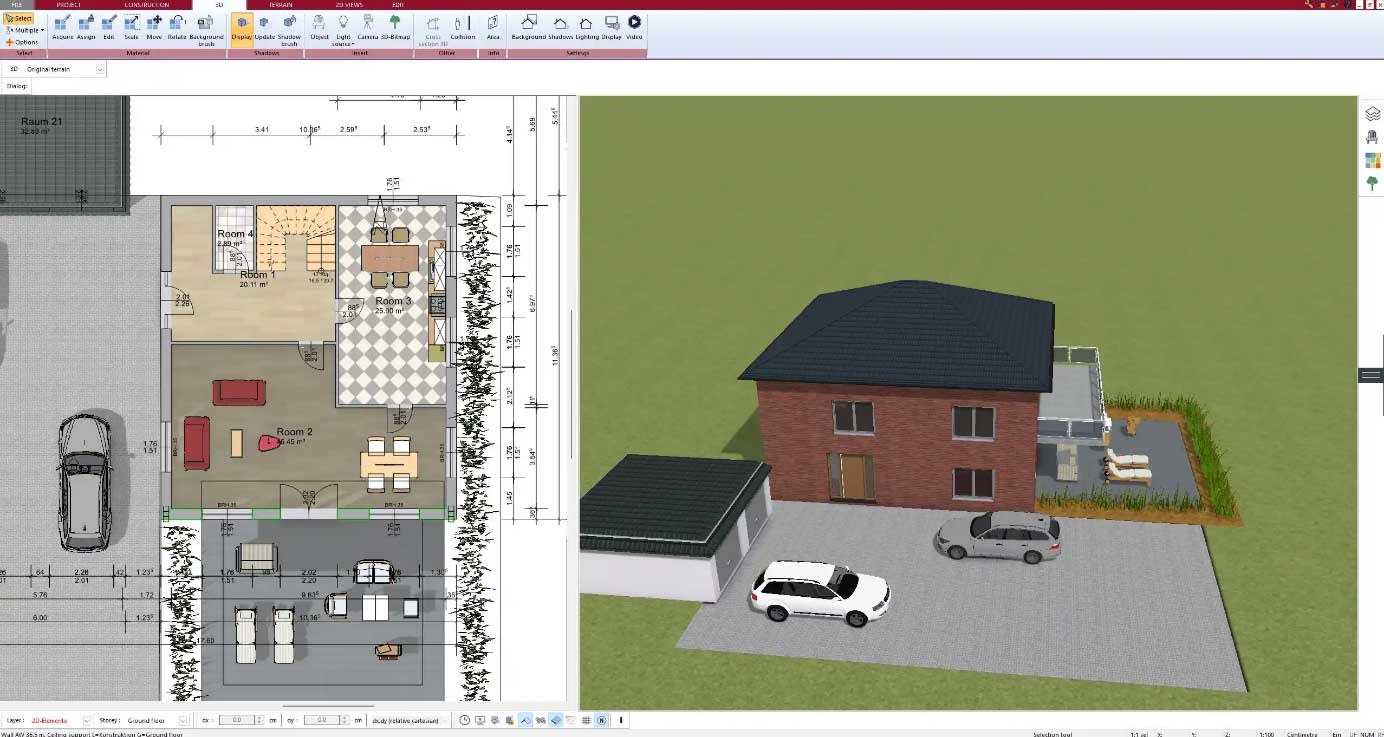
Plan7Architect Pro is clearly made for users who want to plan, build, or renovate a house with full control. Whether you’re starting from scratch or updating an existing property, the software offers everything you need—from drawing walls and placing windows to detailed roof designs and 3D walk-throughs.
Some of its most practical strengths include:
- Drag-and-drop 2D editor and real-time 3D preview
- Switch between metric and imperial units instantly, which is essential if you’re using international references or working with imported plans
- Precision tools like angle measurement, room size calculation, and area reporting
- Professional output files, including construction-ready plans, printable PDFs, and DXF files for contractors
- Material lists and visual textures for realistic presentation
- Works completely offline, which makes it highly reliable on local devices
What convinced me most: I was able to create a floor plan for a real renovation project within a day—even without any prior CAD experience.
Tip:
You can use Plan7Architect Pro in your native unit system (feet/inches or meters/centimeters). This eliminates the need for manual conversion and saves a lot of time during planning.
AutoCAD
AutoCAD is the industry standard for technical drawing, but not necessarily for home design. It’s a powerhouse when it comes to detailed CAD work, especially for professionals in engineering, architecture, and manufacturing. However, for most private users or small builders, AutoCAD is:
- Too complex and overwhelming without specialized training
- Expensive, with subscription models starting at a high monthly fee
- Focused on generic CAD, not tailored to the specifics of home design
- Less visual, as it lacks a dedicated 3D visualization tool for realistic home presentation
While it is technically capable of anything, it’s not optimized for users who want to plan a living space quickly and visually.
SketchUp
SketchUp is a popular tool in the 3D modeling world and especially strong for conceptual design. However, I found that it lacks built-in features for complete architectural planning unless you add plugins. Key points:
- Good for creative design and furniture modeling
- Requires add-ons or plugins for full architectural work
- Somewhat technical interface, especially in the Pro version
- Subscription-based pricing, and the free version lacks essential features
If you’re experienced in 3D design and don’t need a precise floor plan with dimensions and exports, SketchUp might work. But for serious house planning, it requires too much setup.
RoomSketcher
RoomSketcher is easy to use and entirely cloud-based, which makes it convenient. It offers:
- Fast layout tools and visual planning
- Good for interior design or quick sketches
- Requires internet access
- Limited export and print options, unless you pay for a Pro subscription
While I enjoyed the drag-and-drop layout and fast rendering, I quickly hit a wall when I needed technical outputs for a contractor. It’s great for casual use or early concept development, but not for construction-grade plans.
Planner 5D
Planner 5D is designed more for hobby users who want to visualize room layouts quickly. It’s very simple to use but lacks the depth for serious planning.
- Nice visual interface, perfect for creating a mood board or inspiration
- Limited technical control, especially for wall thicknesses or precision dimensions
- No professional exports, and DXF or blueprint functionality is missing
- Web-based only, meaning offline work is not possible
If you’re simply playing with furniture layouts or planning a dream home in theory, it’s fun. But for execution, it’s insufficient.
Sweet Home 3D
Sweet Home 3D is free and open-source, which is great from a budget perspective. However, the interface feels outdated, and it’s not easy to create complex or precise plans. Here’s what I noticed:
- Works offline, which is a plus
- Basic 3D preview, but low visual quality
- No support for advanced export formats
- Lacks support for international standards and measurements
If you’re on a tight budget and just want to draft a simple plan, it can be helpful. But don’t expect professional results.
When Plan7Architect Pro Is the Best Choice
You should choose Plan7Architect Pro if you are:
- Planning a home or renovation yourself, without hiring a full design team
- Looking for a single payment solution without monthly costs
- Needing professional output files to share with builders or permit offices
- Working in either imperial or metric systems, or switching between both
- Wanting full local control without relying on online platforms
For private builders and homeowners, it simply hits the sweet spot between ease of use and serious planning functionality.

When Another Tool Might Suit You Better
There are cases where other tools might work better, especially if you:
- Already use AutoCAD or SketchUp professionally
- Only need a quick visualization, not construction-ready files
- Don’t mind monthly payments and work mostly online
- Prefer to sketch interior design concepts rather than build full plans
But even then, you might find Plan7Architect Pro a useful second tool, especially for visual floor layout and export purposes.
Final Verdict – Plan7Architect Pro Is Ideal for Private Builders
After using and testing all major tools on the market, I can say with confidence that Plan7Architect Pro offers the best all-in-one solution for real home planning. It’s affordable, detailed, flexible, and accessible to both beginners and advanced users. Whether you’re building, remodeling, or just designing your dream home, it delivers everything you need—without monthly fees or a steep learning curve.
If you’re serious about turning your ideas into a real floor plan, this is the tool that gets you there.
You Might Also Like




Related Topics